
Missed Call Service and CRM Integration for Lead Tracking
Learn how missed call service and CRM integration helps businesses capture enquiries, track leads, manage follow-ups, and measure campaign performance.
Abhishek Prakash
•Strategic sales leader with deep focus on customer relationship building and revenue growth. With over two decades of experience at corporates like IBM, Bharti Airtel, and Reliance Jio, driving excellence in enterprise profitability and competitive advantage.
Missed Call Service and CRM Integration: How to Turn Calls into Trackable Leads
A customer sees your advertisement and wants to know more about your product or service. Instead of speaking to an agent, they give a missed call to your business number. Your missed call service from Mtalkz captures their phone number, helping your team identify the enquiry and follow up.
But how do you track these enquiries and know which ones turn into customers? This is where CRM integration helps. By connecting your missed call service with a Customer Relationship Management (CRM) system, you can send call details to one place, create or update lead records, and track follow-ups.
Let’s understand how to integrate missed calls with CRM, the information you can track, and how this connection helps your team manage leads and measure campaign results.
What Is the Connection Between a Missed Call Service and a CRM?
When missed call service connects with a CRM, it becomes easy to turn an unanswered phone call into an automated, trackable lead generation and follow-up workflow. They do different jobs, but they can work together.
At Mtalkz, missed call service allows a customer to contact your business by making a missed call. The system can record details such as the caller's phone number, date, and time of the call.
A CRM (Customer Relationship Management) system allows businesses to manage customer and lead information. If you have a CRM system, your sales teams can easily track calls, follow-ups, notes, lead status, and other customer details.
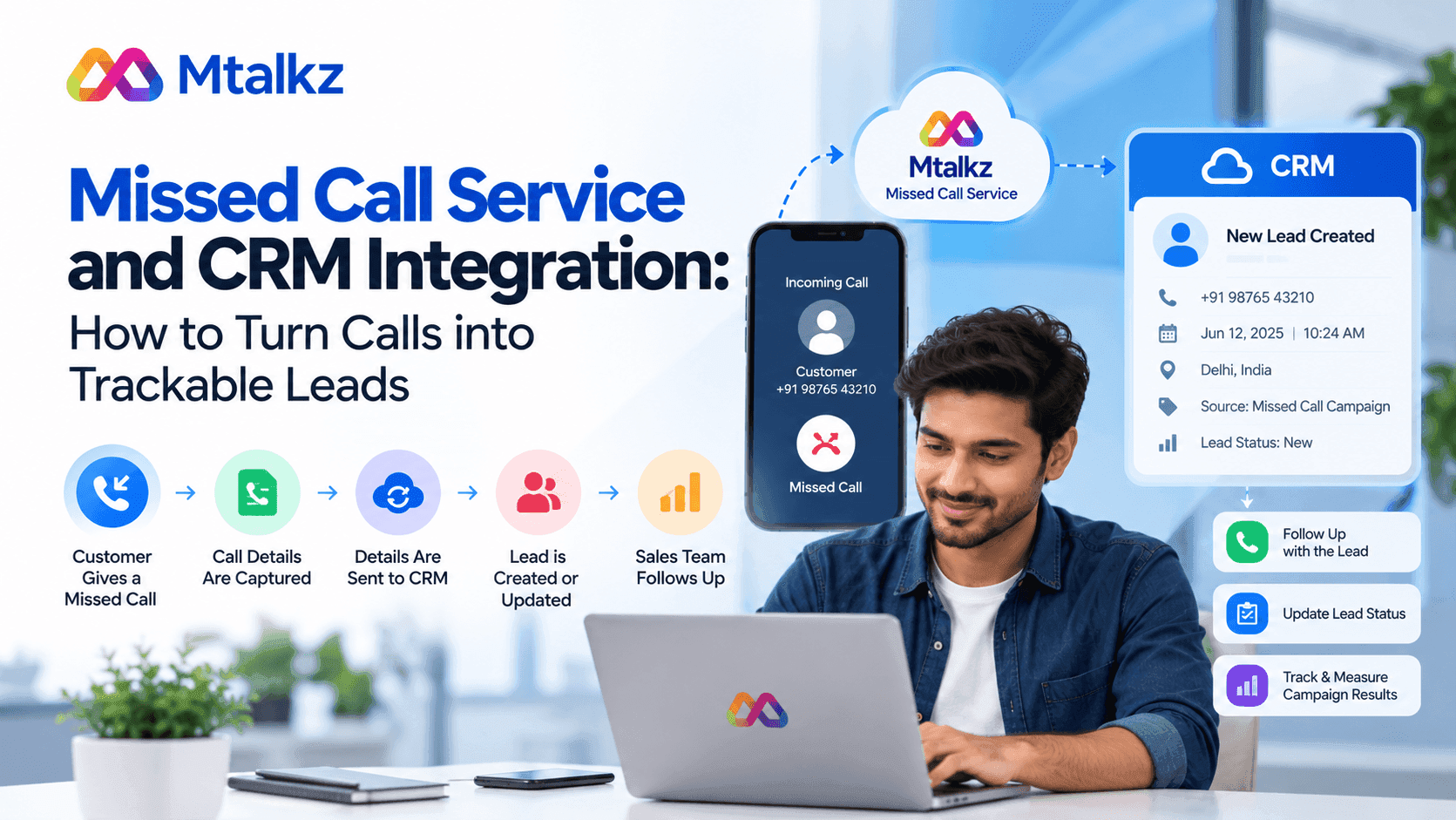
When these systems are integrated, information from a missed call can move into the CRM.
For example:
Customer gives a missed call → Call details are captured → Details are sent to the CRM → Lead is created or updated → Sales team follows up → Result is recorded.
This is how you can track what happens after a missed call.
Why You Should Connect Missed Calls With a CRM?
A missed call tells you that someone tried to contact your business. However, a missed call alone does not tell your sales team what action to take next.
If you don’t have a proper tracking system, your team has to check call records, copy phone numbers, and create leads manually. It is a tedious process and takes a lot of time. Also, there is a chance of forgetting some enquiries.
Through CRM integration, you can put the missed call into the same system, and your team can easily manage leads. They can track
- Who called
- Time of the call
- Location of the lead
- Whether someone has called them back
- What happened during the follow-up
- What the next action should be
With these details in one place, your team can track customer enquiries and manage leads more easily.
How to Integrate Missed Calls With CRM?
The integration of missed calls with your customer relationship management platform depends on the service you use. Here are the steps to integrate a missed call service with your CRM:
Step 1: Set Up the Missed Call Number
The first step is to get a missed call number from a missed call service provider. We start by assigning a unique missed call number to businesses before integration. Customers can call this number to show their interest.
The customer can give a missed call without speaking to an agent. The system can capture the caller's number and call information.
Step 2: Connect the Missed Call Service to the CRM
The missed call service needs to communicate with the CRM system. For that, we need to go through a direct integration, API, webhook, or another supported connection.
With an API integration, we can allow two systems to exchange information. Likewise, a webhook can send information to another system when a particular event happens.
For example, when a new missed call is received, the system can send the caller's details to the CRM.
Step 3: Send Call Details to the System
The integration needs to decide what information should move into the CRM. It includes
- Customer phone number
- Date and time of the call
- Missed call number
- Lead source
- Call status
- Campaign information, where available
The information available will depend on the features of the missed call service and CRM.
Step 4: Create or Update the Lead
Once the CRM receives the call information, it can create a new lead or update an existing customer record.
For example, suppose a customer has already contacted your business before. When the same number gives a missed call, the CRM may add the new interaction to that customer's existing record instead of creating another lead.
This will help you keep customer information organised.
Step 5: Start the Follow-Up
Now, you have captured the details. You should know what to do with the new lead. Depending on the features of the CRM, you can assign the lead to the sales team or create a callback task.
The agent can then call the customer and add notes about the conversation.
This creates a record from the first missed call to the next sales action.
What Information Should Be Sent to the CRM?
You do not need to send every possible piece of information to your CRM system. Share the details that matter to your business so your sales team can work efficiently:
At a basic level, the CRM should receive:
If you keep the data simple, your team can use the system easily.
How Does This Turn a Missed Call Into a Trackable Lead?
The advantage of integrating CRM with missed calls is that it extends the process beyond call logs.
For example,
You run an advertisement so people give a missed call for more information and connect with your business. A customer sees the advertisement and gives a missed call. As you have missed call services, you can record the phone number.
Through integration, you can send the information to the CRM and consider it a lead. Your sales team can call the person back to see whether they are interested in your product or service. Your team can update the lead status in the CRM.
Now you can track the customer journey:
Missed call → New lead → Callback → Interested → Sale
This is much easier to measure than keeping a list of missed numbers in a phone.
What Are the Common Use Cases of CRM Integration with Missed Calls?
Missed call and CRM integration can be useful in many industries where phone enquiries are important. Let’s understand how CRM integration helps to scale business growth in different industries.
Education
A school, college, coaching centre, or training company can use a missed call number for course enquiries. New callers can be added to the CRM so the admissions team can follow up.
Real Estate
Property businesses can use missed calls to capture interest from people who see a property advertisement. Sales agents can then follow up and update the lead in the CRM.
Healthcare
Healthcare businesses can use missed call services to receive appointment enquiries and callback requests. The CRM can help the team keep track of these enquiries, subject to applicable privacy and communication requirements.
Retail
A business can use a missed call campaign to let customers ask about a product, special promotion, or service. The resulting enquiries can be tracked through the CRM.
Financial Services
Financial businesses can use missed call campaigns to generate enquiries about products or services. CRM integration can help sales teams track and follow up with these leads while following applicable regulatory requirements.
Can CRM Integration Help With Missed Call Campaign Tracking?
With CRM integration, businesses can understand which missed call campaigns are generating enquiries, especially when you are using different missed call numbers for different campaigns.
You can use one number for a social media campaign, another for a newspaper advertisement, and another for a website campaign. When this information is passed to the CRM, you can compare the leads from each source.
This can help you get answers to such questions:
- Which campaign generated the most missed calls?
- How many callers were contacted?
- How many leads became customers?
- Which source generated better-quality leads?
This turns a missed call campaign into something the business can measure.
What Happens After a Missed Call Reaches the CRM?
Sending the caller's number to the CRM is only one part of the process. However, your sales team still needs a clear follow-up process.
A simple workflow could look like this:
New missed call → CRM creates lead → Agent receives callback task → Agent contacts customer → Lead status is updated.
The CRM can then keep a record of the interaction.
What Should Businesses Check Before Integrating a Missed Call Service With CRM?
Before asking the technical team to integrate your CRM with missed call services, check that both systems can share the information you need.
Look at:
- CRM compatibility: Check whether your missed call service can connect with your CRM.
- API or webhook access: Find out what integration methods are available.
- Data fields: Check which call details can be sent to the CRM.
- Duplicate leads: Make sure the setup can handle callers who have already been added to the CRM.
- Follow-up process: Decide who receives new leads and how quickly they should be contacted.
- Data security: Customer information should be transferred and stored securely, with access limited to authorised users.
A small test call before launch can help find problems with the data flow.
Is Missed Call CRM Integration Useful for Lead Generation?
Yes, especially for businesses that use missed calls as a way to collect customer enquiries. A missed call makes it easy for a customer to show interest. CRM integration then gives the business a way to organise and follow up on that interest.
The two systems solve different parts of the problem:
- Missed Call Service: Captures the customer's response.
- CRM: Organises the customer information and sales process.
- Integration: Moves the information from one system to the other.
Together, they can create a simple lead tracking system.
How Can Mtalkz Help With Missed Call Campaigns?
Mtalkz provides missed call solutions that businesses can use to connect with customers and generate enquiries through phone calls. For businesses that want to use missed calls for lead generation, connecting the missed call workflow with a CRM can help the sales team track new enquiries and follow up with callers.
The exact CRM integration method depends on the CRM and the features supported by the missed call setup.
If your business wants to use missed calls as part of its customer communication strategy, explore the Mtalkz Missed Call Service to understand the available features and setup options.
Frequently Asked Questions
How do I integrate missed calls with CRM?
Connect your missed call service to the CRM using a supported integration method such as an API, webhook, or direct connector. Send the caller's details to the CRM, map the required fields, and set up a process for lead follow-up.
Can a missed call create a lead in CRM?
Yes, when the integration supports automatic lead creation. The caller's number and other available call details can be sent to the CRM, where the system can create a new lead or update an existing record.
What is the benefit of missed call and CRM integration?
The integration of missed calls and CRM helps businesses keep missed call enquiries in one place. Sales teams can see who called, follow up with the caller, update the lead status, and track what happened after the missed call.
Can missed call campaigns be tracked in a CRM?
Yes, missed call campaign information can be passed to the CRM when the setup supports it. This can help businesses see how many leads came from different missed call campaigns and track their progress.
Do I need an API to connect missed calls with CRM?
You do not need an API or coding skills to connect missed calls with CRM. Some services provide direct CRM integrations or other connection methods. A custom integration may require an API when a direct connection is not available.

