
Leveraging WhatsApp in Customer Support: 10 Game-changing Tips
Abhishek Prakash
•Strategic sales leader with deep focus on customer relationship building and revenue growth. With over two decades of experience at corporates like IBM, Bharti Airtel, and Reliance Jio, driving excellence in enterprise profitability and competitive advantage.
WhatsApp isn’t just a messaging app; it’s a powerful communication tool that allows businesses to connect with customers in real-time. With over 2 billion users worldwide, it offers a direct line to your customers, making it easier to resolve issues, provide information, and build stronger relationships. The platform's versatility and accessibility have made it a preferred choice for businesses across various industries, from e-commerce and healthcare to finance and hospitality. In this blog, let’s explore ten practical tips that can help your business harness the full potential of WhatsApp for customer support. Whether you’re looking to improve response times, personalize interactions, or scale your support efforts, these tips will equip you with the tools and strategies needed to enhance your customer support and deliver exceptional service.
The first step in leveraging WhatsApp for customer support is to set up a dedicated WhatsApp Business account. Unlike the standard WhatsApp app, the WhatsApp Business app is specifically designed with features that cater to the needs of businesses, making it an essential tool for professional communication.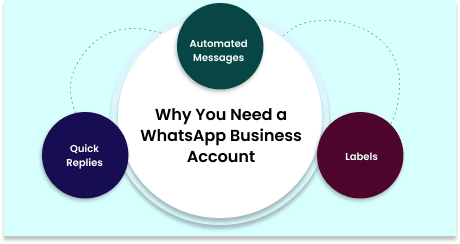 A dedicated business account not only separates your personal and professional communications but also enhances your brand’s credibility. With this account, you can create a detailed business profile that includes your company’s name, address, website, and a brief description of your services. This makes it easier for customers to find your contact information and trust that they’re communicating with the official business representative. Moreover, the WhatsApp Business app comes with features that streamline customer interactions:
- Automated Messages: Set up automated welcome messages that greet customers as soon as they reach out to you. This ensures that customers feel acknowledged, even when they contact you outside of business hours.
- Quick Replies: Create templates for frequently asked questions or common responses. Quick replies save time and help maintain consistency in your communication.
- Labels: Organize customer chats by categorizing them with labels such as ‘New Customer,’ ‘Pending Payment,’ or ‘Support Request.’ This feature is particularly useful for managing a large volume of inquiries and ensuring that no customer is overlooked.
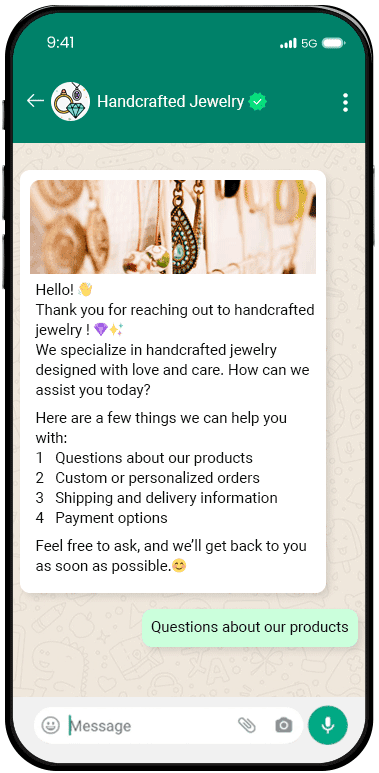 Consider a small e-commerce store that specializes in handcrafted jewelry. Before adopting WhatsApp Business, they struggled to keep up with customer inquiries across different platforms. By setting up a dedicated WhatsApp Business account, they centralized their customer support, providing a single point of contact for all inquiries. The store utilized automated messages to confirm order receipts and set up quick replies for common questions about product availability, shipping times, and return policies. As a result, they noticed a significant improvement in response times and customer satisfaction, leading to an increase in repeat customers. By setting up a WhatsApp Business account, you not only enhance your customer support capabilities but also project a more professional image to your clients. This foundational step sets the stage for the more advanced strategies we’ll explore in the upcoming tips.
Efficiency is key in customer support, and one of the most effective ways to improve it is by utilizing WhatsApp’s automated responses. Automated responses help ensure that your customers receive timely communication, even when your team is unavailable to respond instantly. This feature can significantly enhance the customer experience by providing quick and consistent answers to common inquiries.Instant Acknowledgment: Automated responses allow you to instantly acknowledge customer messages, making them feel valued and reassured that their inquiry is being addressed. This is particularly important outside of regular business hours or during peak times when your support team may be overwhelmed.
A dedicated business account not only separates your personal and professional communications but also enhances your brand’s credibility. With this account, you can create a detailed business profile that includes your company’s name, address, website, and a brief description of your services. This makes it easier for customers to find your contact information and trust that they’re communicating with the official business representative. Moreover, the WhatsApp Business app comes with features that streamline customer interactions:- Automated Messages: Set up automated welcome messages that greet customers as soon as they reach out to you. This ensures that customers feel acknowledged, even when they contact you outside of business hours.
- Quick Replies: Create templates for frequently asked questions or common responses. Quick replies save time and help maintain consistency in your communication.
- Labels: Organize customer chats by categorizing them with labels such as ‘New Customer,’ ‘Pending Payment,’ or ‘Support Request.’ This feature is particularly useful for managing a large volume of inquiries and ensuring that no customer is overlooked.
Consider a small e-commerce store that specializes in handcrafted jewelry. Before adopting WhatsApp Business, they struggled to keep up with customer inquiries across different platforms. By setting up a dedicated WhatsApp Business account, they centralized their customer support, providing a single point of contact for all inquiries. The store utilized automated messages to confirm order receipts and set up quick replies for common questions about product availability, shipping times, and return policies. As a result, they noticed a significant improvement in response times and customer satisfaction, leading to an increase in repeat customers. By setting up a WhatsApp Business account, you not only enhance your customer support capabilities but also project a more professional image to your clients. This foundational step sets the stage for the more advanced strategies we’ll explore in the upcoming tips.Efficiency is key in customer support, and one of the most effective ways to improve it is by utilizing WhatsApp’s automated responses. Automated responses help ensure that your customers receive timely communication, even when your team is unavailable to respond instantly. This feature can significantly enhance the customer experience by providing quick and consistent answers to common inquiries.Instant Acknowledgment: Automated responses allow you to instantly acknowledge customer messages, making them feel valued and reassured that their inquiry is being addressed. This is particularly important outside of regular business hours or during peak times when your support team may be overwhelmed.
Instant Acknowledgment: Automated responses allow you to instantly acknowledge customer messages, making them feel valued and reassured that their inquiry is being addressed. This is particularly important outside of regular business hours or during peak times when your support team may be overwhelmed.
Welcome Messages: Create a warm and welcoming message that is automatically sent to customers when they first reach out. This message can include a brief introduction to your business, your hours of operation, and an assurance that someone will be in touch shortly.
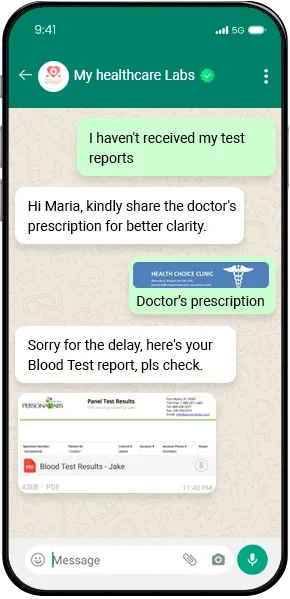 A healthcare clinic used WhatsApp's automated responses to manage appointment bookings and share lab results. When a patient sends a message to book an appointment, they immediately receive a welcome message confirming their request and providing additional details about the next steps. If the patient sends a message after hours, an away message informs them that the clinic is closed and provides a link to an online booking system or an emergency contact number. This automation not only reduced the clinic’s response time but also improved patient satisfaction by ensuring that their inquiries were promptly acknowledged. By integrating automated responses into your WhatsApp customer support strategy, you can maintain a high level of service, even when your team is unavailable. This feature is a simple yet powerful way to enhance customer satisfaction and ensure that your business is always responsive to customer needs.
Integrating WhatsApp with your Customer Relationship Management (CRM) system is a powerful way to streamline your customer support and provide a more personalized experience. By combining the strengths of WhatsApp's instant messaging capabilities with the data management and automation features of a CRM, you can create a seamless support process that boosts efficiency and customer satisfaction.Centralized Customer Data: When WhatsApp is integrated with your CRM, all customer interactions are automatically logged and organized within a single platform. This centralization ensures that your support team has access to comprehensive customer histories, including past interactions, purchase history, and personal preferences. Having all this information at their fingertips allows your team to provide faster, more personalized responses.
Centralized Customer Data: When WhatsApp is integrated with your CRM, all customer interactions are automatically logged and organized within a single platform. This centralization ensures that your support team has access to comprehensive customer histories, including past interactions, purchase history, and personal preferences. Having all this information at their fingertips allows your team to provide faster, more personalized responses.
Choose a CRM with WhatsApp Integration Capabilities: Ensure that your CRM system either natively supports WhatsApp integration or can be connected through third-party tools. Popular CRMs like Salesforce, HubSpot, and Zoho offer robust integration options for WhatsApp.
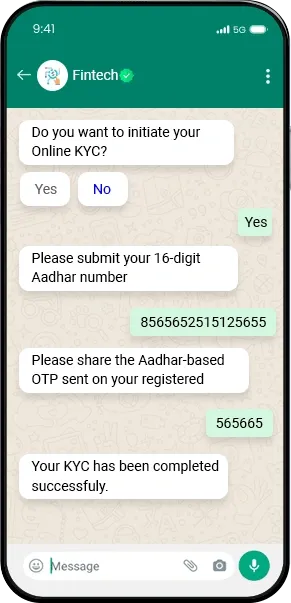 A fintech company that offers digital payment solutions integrated WhatsApp with their CRM to streamline customer support. Before the integration, support agents had to manually search for customer information across multiple systems, leading to delays and inconsistent responses. After integrating WhatsApp with their CRM, all customer interactions were logged automatically, and agents could quickly access detailed customer profiles. The company also set up automated workflows for common queries, such as account balance checks and transaction history requests, reducing response times and improving customer satisfaction. Integrating WhatsApp with your CRM system is a strategic move that can elevate your customer support by making it more efficient, personalized, and data-driven. This integration ensures that your support team has the tools they need to deliver exceptional service consistently, helping you build stronger relationships with your customers.
One of the greatest advantages of using WhatsApp for customer support is its ability to provide real-time communication. Customers value immediate responses and timely assistance, and WhatsApp’s instant messaging capabilities allow you to meet these expectations effectively. Leveraging WhatsApp for real-time support can significantly enhance the customer experience and improve satisfaction.Instant Problem Resolution: Real-time communication enables you to address customer issues and questions as they arise, reducing the time customers have to wait for solutions. This immediacy is crucial in situations where quick decision-making or immediate assistance is required.
Instant Problem Resolution: Real-time communication enables you to address customer issues and questions as they arise, reducing the time customers have to wait for solutions. This immediacy is crucial in situations where quick decision-making or immediate assistance is required.
Monitor Your WhatsApp Account Regularly: Ensure that your support team is actively monitoring your WhatsApp account during business hours. Set up notifications to alert team members when new messages come in, so they can respond promptly.
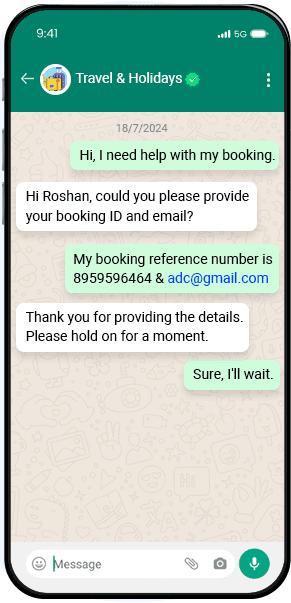 An online travel agency implemented WhatsApp for real-time customer support to handle booking inquiries, flight status updates, and travel disruptions. By providing immediate responses, they were able to assist customers with last-minute changes, rebook flights, and offer real-time solutions during travel issues. Customers appreciated the convenience of getting quick answers and updates, leading to higher satisfaction rates and a reduction in negative reviews. In another example, a tech support company used WhatsApp to provide real-time assistance for their software products. Customers could send screenshots of errors or issues they were facing, allowing support agents to diagnose and resolve problems more effectively. This approach not only improved response times but also helped reduce the number of follow-up interactions needed to resolve technical issues. By leveraging WhatsApp for real-time support, you can enhance the speed and quality of your customer interactions, ultimately leading to a better customer experience and increased loyalty. This tip highlights the importance of timely communication and how it can be effectively managed using WhatsApp’s real-time capabilities.
One of WhatsApp’s standout features is its ability to send and receive rich media, such as images, videos, PDFs, and voice notes. Utilizing these rich media options can significantly enhance your customer interactions, providing more detailed and engaging support compared to traditional text-based communication.Improved Clarity: Sending images or videos can help clarify instructions, provide visual demonstrations, or show product features. This is especially useful for troubleshooting issues or guiding customers through processes.
Improved Clarity: Sending images or videos can help clarify instructions, provide visual demonstrations, or show product features. This is especially useful for troubleshooting issues or guiding customers through processes.
Create Visual Guides and Tutorials: Develop step-by-step guides or video tutorials to help customers navigate common issues or use your products more effectively. These can be shared as needed to provide immediate assistance.
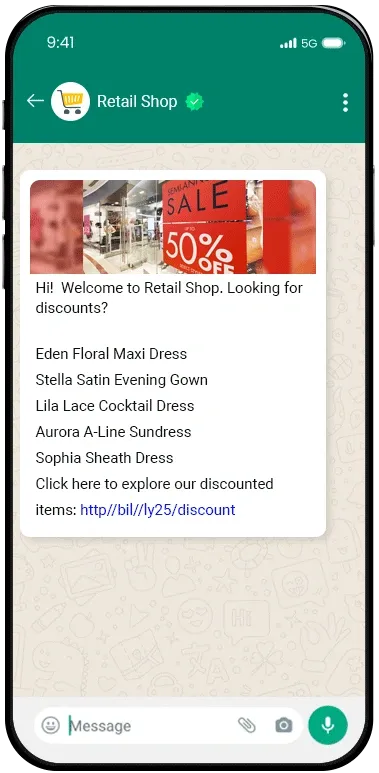 An online retail store used WhatsApp to assist customers with product inquiries and support. When customers had questions about the fit or functionality of an item, the support team would send high-resolution images or short video clips demonstrating the product in use. This approach not only helped customers make more informed decisions but also reduced the number of returns and exchanges. Another example is a software company that provided customer support through WhatsApp. When users encountered issues or needed help with installation, the support team would send voice notes explaining troubleshooting steps or share PDF manuals directly via WhatsApp. This method of communication proved to be more effective than lengthy text explanations and helped resolve issues faster. By integrating rich media into your WhatsApp customer support strategy, you can enhance the quality of your interactions and provide more comprehensive assistance. This approach not only improves clarity and engagement but also helps in delivering a more professional and efficient support experience.
Personalization is key to building strong customer relationships and enhancing overall satisfaction. Using WhatsApp’s capabilities to personalize your communication can make your customers feel valued and understood, which can lead to increased loyalty and positive interactions.Enhanced Customer Experience: Personalizing messages helps customers feel recognized and appreciated. When communication reflects an understanding of their specific needs and preferences, it enhances their overall experience.
Enhanced Customer Experience: Personalizing messages helps customers feel recognized and appreciated. When communication reflects an understanding of their specific needs and preferences, it enhances their overall experience.
Use Customer Names: Address customers by their names in messages. This simple gesture can make your communication feel more personal and less robotic.
A luxury hotel chain used WhatsApp to offer personalized guest experiences. Before a guest’s arrival, the hotel’s support team sent a personalized message asking about any special requests or preferences. During the stay, they used WhatsApp to provide tailored recommendations for local attractions and dining options based on the guest’s interests. This personalized approach not only enhanced the guest’s experience but also resulted in positive reviews and repeat bookings. Another example is a beauty and skincare brand that used WhatsApp to follow up with customers after they made a purchase. The support team sent personalized messages with tips on how to use the products effectively, along with recommendations for complementary products. This level of personalization not only improved customer satisfaction but also drove additional sales. By focusing on personalization, you can create more meaningful interactions with your customers through WhatsApp. Personalizing your communication helps build stronger relationships, increases engagement, and ultimately contributes to a more positive and memorable customer experience.Chatbots are an excellent solution for scaling customer support operations and handling a large volume of inquiries efficiently. By integrating chatbots with WhatsApp, you can automate repetitive tasks, provide instant responses, and ensure consistent service even during peak times.
- 24/7 Availability: Chatbots can operate around the clock, providing immediate assistance and answering questions even outside of regular business hours. This ensures that customers always have access to support when they need it.
- Handling High Volumes: Chatbots can manage multiple conversations simultaneously, which is especially useful during high-traffic periods. This capability reduces wait times and ensures that no customer inquiry goes unanswered.
- Consistent Responses: Automated responses from chatbots ensure that customers receive accurate and consistent information. This helps maintain service quality and reduces the risk of human error.
Define Common Use Cases: Identify the common queries or tasks that your chatbot will handle. These could include frequently asked questions, appointment scheduling, order tracking, or basic troubleshooting.
- 24/7 Availability: Chatbots can operate around the clock, providing immediate assistance and answering questions even outside of regular business hours. This ensures that customers always have access to support when they need it.
- Handling High Volumes: Chatbots can manage multiple conversations simultaneously, which is especially useful during high-traffic periods. This capability reduces wait times and ensures that no customer inquiry goes unanswered.
- Consistent Responses: Automated responses from chatbots ensure that customers receive accurate and consistent information. This helps maintain service quality and reduces the risk of human error.
Define Common Use Cases: Identify the common queries or tasks that your chatbot will handle. These could include frequently asked questions, appointment scheduling, order tracking, or basic troubleshooting.
A telecommunications company implemented a WhatsApp chatbot to handle customer support inquiries related to billing, service plans, and technical issues. The chatbot was programmed to answer common questions, provide account information, and guide customers through troubleshooting steps. During peak times, the chatbot managed thousands of interactions simultaneously, significantly reducing the workload on human agents and improving response times. Customers appreciated the immediate assistance and the option to escalate to a live agent if their issue required further attention. Another example is an online food delivery service that used a WhatsApp chatbot to handle order placements and status updates. The chatbot guided customers through the ordering process, confirmed orders, and provided real-time updates on delivery status. This automation not only streamlined the ordering process but also allowed the customer support team to focus on more complex issues and inquiries. By implementing WhatsApp chatbots, you can scale your customer support operations effectively, providing instant assistance and managing high volumes of interactions with ease. Chatbots enhance efficiency, ensure consistent service, and help you deliver a better overall customer experience.To continuously improve your WhatsApp customer support, it’s crucial to monitor and analyze interactions. Tracking key metrics and gathering insights from your WhatsApp conversations can help you identify areas for improvement, optimize your support processes, and enhance overall customer satisfaction.Identify Trends and Issues: By analyzing conversation data, you can identify recurring issues or frequently asked questions. This insight helps you address common problems more effectively and update your support resources accordingly.
Identify Trends and Issues: By analyzing conversation data, you can identify recurring issues or frequently asked questions. This insight helps you address common problems more effectively and update your support resources accordingly.
Use Analytics Tools: Leverage analytics tools integrated with your WhatsApp Business account or CRM system to track key metrics. Many platforms offer built-in reporting features that provide insights into message volumes, response times, and customer feedback.
A retail company used WhatsApp analytics to monitor customer support interactions and identify common issues related to product returns. By analyzing conversation data, they discovered that many customers were confused about the return process. In response, they updated their FAQs and created a video tutorial to guide customers through the return process. This change reduced the number of return-related inquiries and improved overall customer satisfaction. Another example is a tech support provider that used feedback collected from WhatsApp interactions to enhance their service. After receiving feedback about long wait times for certain types of support, they adjusted their staffing levels and trained their team to handle specific issues more efficiently. This led to faster resolution times and higher customer satisfaction scores. By monitoring and analyzing WhatsApp interactions, you gain valuable insights into your customer support performance and can make informed decisions to improve your service. This ongoing process of evaluation and optimization helps ensure that you’re meeting customer expectations and delivering a high-quality support experience.When using WhatsApp for customer support, it’s essential to ensure that you comply with data privacy regulations. Handling customer data responsibly and in accordance with legal requirements not only protects your customers but also builds trust and credibility for your business.Protect Customer Data: Compliance with data privacy regulations helps safeguard sensitive customer information, such as personal details and communication records, from unauthorized access or misuse.
Protect Customer Data: Compliance with data privacy regulations helps safeguard sensitive customer information, such as personal details and communication records, from unauthorized access or misuse.
General Data Protection Regulation (GDPR): If you handle data from customers in the European Union, GDPR requires you to obtain explicit consent for collecting and processing personal data. Ensure that your WhatsApp interactions are compliant with these requirements by providing clear privacy notices and obtaining consent where necessary.
Implement Data Protection Policies: Develop and enforce policies for handling and storing customer data. This includes securing WhatsApp communications and ensuring that only authorized personnel have access to sensitive information.
A financial services company implemented robust data privacy practices for their WhatsApp customer support. They developed a comprehensive data protection policy that outlined how customer data would be handled and used. Prior to initiating conversations, they obtained explicit consent from customers and provided clear information about their data protection measures. Regular training sessions were conducted for support staff to reinforce the importance of data privacy. As a result, the company maintained high levels of customer trust and avoided any compliance-related issues. Another example is a healthcare provider that used WhatsApp for patient communication. They ensured compliance with HIPAA by encrypting all messages and restricting access to patient data. They also provided patients with clear information about their data protection practices and obtained consent before discussing any sensitive health information. This approach helped the provider maintain patient trust and meet regulatory requirements. By ensuring compliance with data privacy regulations, you protect customer information, build trust, and avoid potential legal issues. Adhering to these regulations is a critical aspect of using WhatsApp for customer support, ensuring that your interactions are both secure and respectful of customer privacy.To maintain high-quality customer support and stay competitive, it’s crucial to continuously improve your WhatsApp support strategy. Regularly evaluating and refining your approach ensures that you adapt to changing customer needs, leverage new features, and address any areas for improvement.Adapt to Changing Needs: Regularly reviewing and updating your support strategy helps you stay aligned with evolving customer expectations and industry trends.
Adapt to Changing Needs: Regularly reviewing and updating your support strategy helps you stay aligned with evolving customer expectations and industry trends.
Solicit Customer Feedback: Regularly gather feedback from customers about their support experience. Use surveys, follow-up messages, and direct feedback to identify areas for improvement and understand customer preferences.
An e-commerce company regularly reviewed their WhatsApp support strategy by analyzing customer feedback and performance metrics. They discovered that customers frequently requested order tracking updates. In response, they integrated a new WhatsApp feature that allowed customers to track their orders in real time. Additionally, they updated their training programs to include new best practices for using this feature. As a result, customer satisfaction improved, and the company saw a decrease in order-related inquiries. Another example is a SaaS company that stayed updated on WhatsApp’s latest features and integrated a new automated messaging option to handle common customer queries. They also implemented a monthly review process to assess performance metrics and gather team feedback. By continuously refining their approach, they were able to enhance their support efficiency and provide a more responsive and personalized customer experience. By committing to continuous improvement, you ensure that your WhatsApp support strategy remains effective and aligned with customer expectations. This ongoing process of evaluation and enhancement helps you deliver exceptional service, adapt to new challenges, and maintain a competitive edge in the market. Conclusion Implementing WhatsApp as a tool for customer support offers numerous advantages, from real-time interactions and rich media capabilities to enhanced personalization and scalability. By following these 10 tips, you can effectively leverage WhatsApp to elevate your customer support strategy and provide a superior experience for your clients.- Set Up WhatsApp Business Account: Establish a professional presence with a dedicated WhatsApp Business account to manage and streamline customer interactions.
- Create an Effective Greeting Message: Craft a warm and informative greeting to set the tone for positive and helpful interactions.
- Integrate WhatsApp with Your CRM System: Combine WhatsApp’s messaging capabilities with your CRM to provide personalized and efficient support.
- Leverage Real-Time Support: Utilize WhatsApp’s instant messaging to offer timely assistance and enhance customer engagement.
- Use Rich Media to Enhance Interaction: Incorporate images, videos, and other media to clarify instructions and make communication more engaging.
- Personalize Customer Communication: Address customers by name and reference their history to create a more tailored and meaningful support experience.
- Implement WhatsApp Chatbots for Scalable Support: Automate common queries and tasks with chatbots to manage high volumes of interactions efficiently.
- Monitor and Analyze WhatsApp Interactions: Track key metrics and gather insights to continuously improve your support processes and service quality.
- Ensure Compliance with Data Privacy Regulations: Protect customer data and build trust by adhering to relevant data privacy laws and regulations.
- Continuously Improve Your Support Strategy: Regularly review and refine your approach to stay aligned with customer needs and leverage new features.
By adopting these strategies, you can optimize your WhatsApp support operations, enhance customer satisfaction, and build stronger relationships with your audience. Effective use of WhatsApp not only improves the efficiency of your support but also positions your business as responsive and customer-centric. Embrace these best practices to unlock the full potential of WhatsApp for customer support and deliver exceptional service that meets and exceeds customer expectations.

