
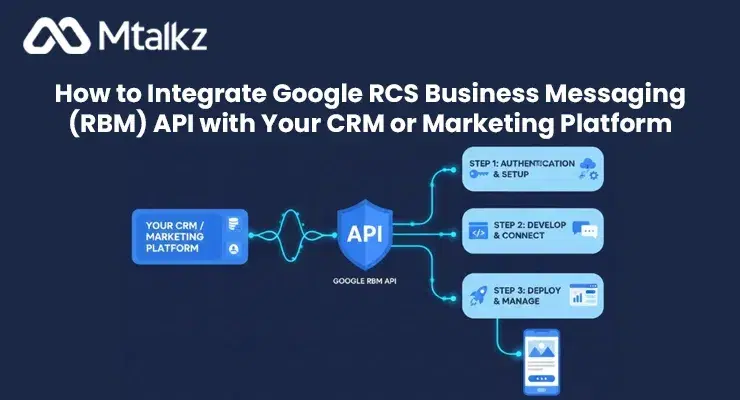
How to Integrate Google RCS Business Messaging (RBM) API with Your CRM or Marketing Platform
Shelly Prakash
•Integrating Google RCS Business Messaging (RBM) API with your CRM or marketing platform can help businesses deliver interactive, personalized, and secure customer engagement directly through native messaging apps. This guide explains the integration process step by step, highlights the benefits of RCS for marketing automation, and shows how you can enhance your campaigns using Mtalkz’s enterprise-grade communication solutions.
What is Google RCS Business Messaging (RBM)?
Google RCS (Rich Communication Services) Business Messaging is an evolution of traditional SMS, allowing brands to send visually rich, interactive messages with buttons, carousels, images, and suggested replies. It provides verified sender IDs, ensuring customers trust your messages while offering a conversational experience directly on Android devices.
With RBM, businesses can do much more than just send text — they can nurture relationships, promote offers, and even complete transactions within chat.
Why Integrate RBM with Your CRM or Marketing Platform
Integrating Google RBM API with your CRM or marketing automation platform ensures seamless communication and unified customer data management. Here are the main benefits:
- Personalized Engagement: Your CRM already stores valuable customer data. Integrating RBM allows you to use that data to personalize every message.
- Automation: Trigger RBM messages based on customer actions like sign-ups, purchases, or inquiries.
- Two-Way Conversations: Customers can respond in real time, helping your team manage queries efficiently.
- Centralized Analytics: Track engagement metrics, read receipts, and delivery insights from one place.
- Omnichannel Marketing: Combine RBM with bulk SMS and email marketing to strengthen overall campaign reach and performance.
Steps to Integrate Google RBM API with Your CRM or Marketing Platform
Step 1: Understand the RBM API Basics
Before integrating, familiarize yourself with Google’s RBM API structure. It uses REST-based endpoints to send and receive messages. You’ll need a verified RBM agent account through an approved partner like Mtalkz, which acts as a Messaging Service Provider (MSP).
Step 2: Get API Access from Your Provider
Once you partner with a certified provider, they’ll provide you with API credentials — including your agent ID, API key, and endpoint URLs. This ensures that your brand messages are authenticated and compliant with Google’s standards.
Step 3: Connect API with Your CRM
Use your CRM’s API module or integration interface to connect with RBM. Most modern CRMs like Salesforce, HubSpot, and Zoho support API-based integrations.
- Configure webhooks to sync contacts and message responses.
- Map customer fields from your CRM to message templates for personalization.
- Test message triggers to ensure smooth automation.
Step 4: Automate Messaging Workflows
After connecting, create automated workflows for marketing and service communications. For instance:
- Send welcome messages after sign-ups.
- Deliver product recommendations after purchases.
- Share order updates or feedback surveys via RCS messages.
You can also integrate this with bulk sms service provider in Bangalore solutions to reach users on both RCS-enabled and traditional SMS platforms.
Step 5: Ensure Compliance and Testing
Before launching, run multiple tests to verify:
- Message rendering on various Android devices.
- Link tracking and analytics integration.
- Opt-in and opt-out compliance per Google’s RBM policy.
Finally, test campaigns in different customer scenarios to ensure personalization and automation are working seamlessly.
Step 6: Launch and Monitor Campaigns
Once the setup is complete, launch your RBM campaigns directly from your CRM. Continuously monitor performance metrics such as open rates, click-through rates, and conversions.
For businesses that engage in international outreach, bulk sms international messaging can complement your RBM strategy, ensuring global reach.
Best Practices for RBM-CRM Integration
Personalize Your Messages
Leverage CRM data like customer preferences and past purchases to create relevant message templates. Personalized RBM messages significantly increase engagement.
Use Rich Media
Incorporate images, buttons, and suggested replies to make messages interactive. This enhances user experience and improves conversion rates.
Monitor Costs and ROI
Evaluate the efficiency of your campaigns regularly. You can compare the bulk sms price of SMS with RCS to optimize your marketing spend and ensure better ROI.
Combine Channels
Don’t rely solely on one channel. Combine RCS with email and SMS to ensure complete customer reach and engagement consistency.
Challenges You Might Face and How to Overcome Them
1. Limited RCS Reach:
Not all devices support RCS. Overcome this by using fallback SMS through an integrated bulk SMS service provider.
2. Integration Complexity:
If your CRM doesn’t support direct integration, work with an experienced partner like Mtalkz to create custom connectors.
3. Message Approvals:
Google requires verification and approval for RBM agents. Partnering with an approved provider streamlines this process.
4. Data Synchronization:
Keep CRM data updated regularly to ensure that messages remain personalized and relevant.
Why Choose Mtalkz for RBM Integration
Mtalkz is a leading cloud communication company offering enterprise-grade messaging and automation solutions. With strong expertise in RBM and CRM integration, Mtalkz helps businesses automate marketing, enhance engagement, and deliver secure communications.
Whether you need localized messaging via a bulk sms service provider in Bangalore or global outreach through bulk sms international messaging, Mtalkz ensures reliability, scalability, and compliance.
Final Thoughts
Integrating Google RCS Business Messaging API with your CRM or marketing platform opens new opportunities for interactive, data-driven customer communication. By partnering with a trusted provider, you can automate workflows, improve engagement, and elevate your brand’s messaging experience.
Ready to revolutionize your customer engagement? Get started with Mtalkz, a trusted leader in enterprise communication solutions.
FAQs
1. What is Google RBM API integration?
It’s the process of connecting your CRM or marketing platform to Google’s Rich Communication Services (RCS) API to send and manage interactive business messages.
2. Can RBM replace traditional SMS?
Not entirely. While RCS offers rich features, SMS remains essential for non-RCS users. Combining both delivers maximum coverage.
3. Do I need a verified agent for RBM?
Yes. Google requires brands to have a verified RBM agent through an authorized provider like Mtalkz.
4. How secure is RBM messaging?
RBM uses verified sender IDs and encryption, making it more secure than traditional SMS.
5. Can I use RBM for international messaging?
Yes, but availability depends on country and carrier support. For global outreach, integrate with bulk sms international messaging.
6. How much does RBM integration cost?
Pricing varies by provider and usage volume. Compare it with bulk sms price options for budget optimization.
7. Which CRMs support RBM integration?
Popular CRMs like Salesforce, HubSpot, and Zoho support API-based RBM integration through connectors.
8. Can I send promotional campaigns via RBM?
Yes. You can use RBM for offers, event invites, and personalized promotions, enhancing your bulk sms and email marketing strategy.

